
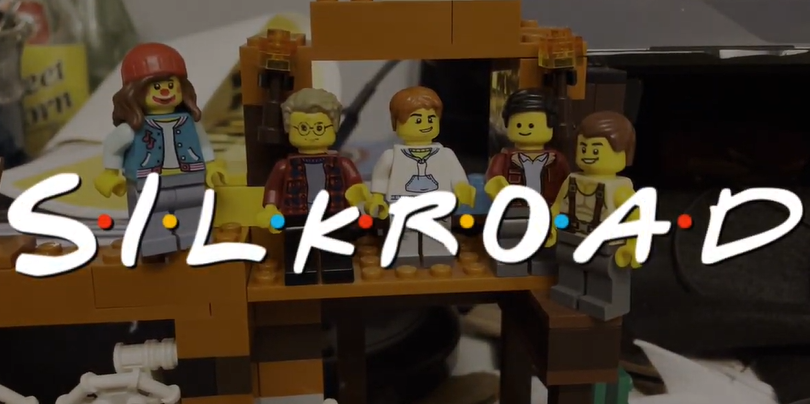
Patriots who have shown prowess when making a group project
When a group of Patriot scholars—Taylon, Quinn, Ryan, Bryce, and Aiden—got together, and put their mind and focus onto a singular project, they are bound to get some incredible results. Here is an inside scoop on what they did to create their project for AP World History!
For some context. Mr. Saar (one of the two AP World teachers) had his classes doing a group project on the “Networks of Exchange,” being either the Silk Roads, Sea Roads or Sand Roads. These patriots chose the Silk Road; all they had to do to complete their project and get full credit was create a historically accurate person, describe four locations along their trade route, and detail two political, religious and technological examples. But these patriots went far above and beyond for their group project, designing an extremely creative project.
The first patriot that was interviewed about the project was junior Ryan James. When asked about the process that he took to create the project he said, “It was two days worth of animation for work on Friday and work on Saturday. I skipped a frame, so it was on twos and it was just all hand drawn using my drawing tablet at home.” This whole process took him about 18 hours in total to complete! Even after all of this difficult work, he still stated, “I’m happy with what we have created, but personally, from my part of it, I wish I could have done more.” Ryan truly represents the “Work Hard” aspect of the Patriot Pillars.

The second and third students that were interviewed were juniors Quinn Valadie and Ayden Lodhi. They used the editing software DaVinci Resolve to edit photos and text together, whilst Ayden “brought everything together.” The group spent an impressive five to six hours crafting their project. When asked how he thought he did, Quinn commented that “I could have done my section better if I planned it better and I scheduled my day,” but also, “I’m happy with how all of it turned out and how everyone came together and it meshed somewhat well.” Ayden, meanwhile, stated “Sure, but I think my part could be improved upon.” Quinn and Ayden demonstrate the patriot dedication because even though Ayden noted that “we stayed up until like nine o’ clock just doing the work,” their project came out fantastic.

The fourth patriot involved in this project was junior Taylon Ray. Taylon made a very creative LEGO stop-motion for his part in the project. Through careful planning and creative editing strategies, his part played a key role in how the video turned out and was a unique spin on the project format compared to others in the class. When asked how he made his part of the project, Taylon stated, “I made sure to write a script and record… the specific audio that I needed. Then, I used specific sources on [Microsoft] Edge and Google and cited them to use in the video… I integrated… Adobe Express-like animation software… you know, [to] make it transition well.” His four hours of work demonstrate how creativity and thinking outside the box can really pay off.

The fifth and final Patriot that was involved in the massive group project was junior Bryce Richards. Bryce was responsible for a good portion of the project. Not only did he have to edit all of his team’s parts together, but he also had to record the parts that were shot at students’ houses. When asked about how long it took him to put the project together, Bryce responded with, “Three hours a day. Then, I couldn’t finish until everyone else finished because I was the editor that put everything together.” When asked if he would do it again, Bryce responded with, “Yeah, I think it was fun”. To be able to spend 3 hours everyday on a project and still want to do so again demonstrates extreme resilience and dedication to his group.

Here is the link to the project:AP World Project.mov – Google Drive